
One-time purchase
No subscription
One license key works on two devices, on macOS and Windows, with no renewal fees. Try Eagle free for 30 days before you buy.
Frequently Asked Questions
Answers about license keys, devices, refunds, and invoices.
How many devices can be activated by one license key?
Each set of the license key is able to activate two devices, and Eagle is available on both macOS and Windows, you can change which devices you want to activate without any limitation. In the case that you lose or change your PC, the license key is still available on the new device.
To put it simply, the license key can:
- Activate two devices (The license key is bound to the same email)
- Unbind from activated devices at will, there is no limit on the count of reactivation.
- Available on both macOS and Windows
If you’re looking to add seats, devices to your license, you can add extra seats to your existing license key.
Can I add an extra seat or device to my existing license key?
Originally each set of the license key can activate only two devices. Although you can change which devices you want to activate without any limitation, it's still troublesome to activate, deactivate repeatedly between devices.
Now you can easily solve this problem. You can add extra seats to your existing license key. For example, if you want to activate three devices, you can pay to activate one extra device.
Remark:
- In order to add more seats, you have to purchase one set of license key in advance.
- When you pay to add more seats and active devices, you have to enter the email which you used for activating the very first time. You can't associate the license key with 2 or more different emails.
Is my license key lifetime valid?
Yes, the eagle License key is lifetime valid and there are no additional charges for future upgrades. You can authorize two devices for each set of key, the app is available on both macOS and Windows, you can change which devices you want to activate without any limitation. In the case that you lost or change your PC, the license key is still available on the new device.
To put it simply, the license key is:
- lifetime valid
- able to activate two devices (The license key is bound to the same email)
- able to unbind devices at will, there is no limit on the count of reactivation.
- available on both macOS and Windows
I lost my license key, can you resend it to me?
If you've lost your Eagle software license key, you can recover it using the following methods.
Self-Service Recovery Options
-
Check Your Email Records: Search for keywords like "Eagle" or "Eagle App License Key" in your inbox to find messages containing your license key.
-
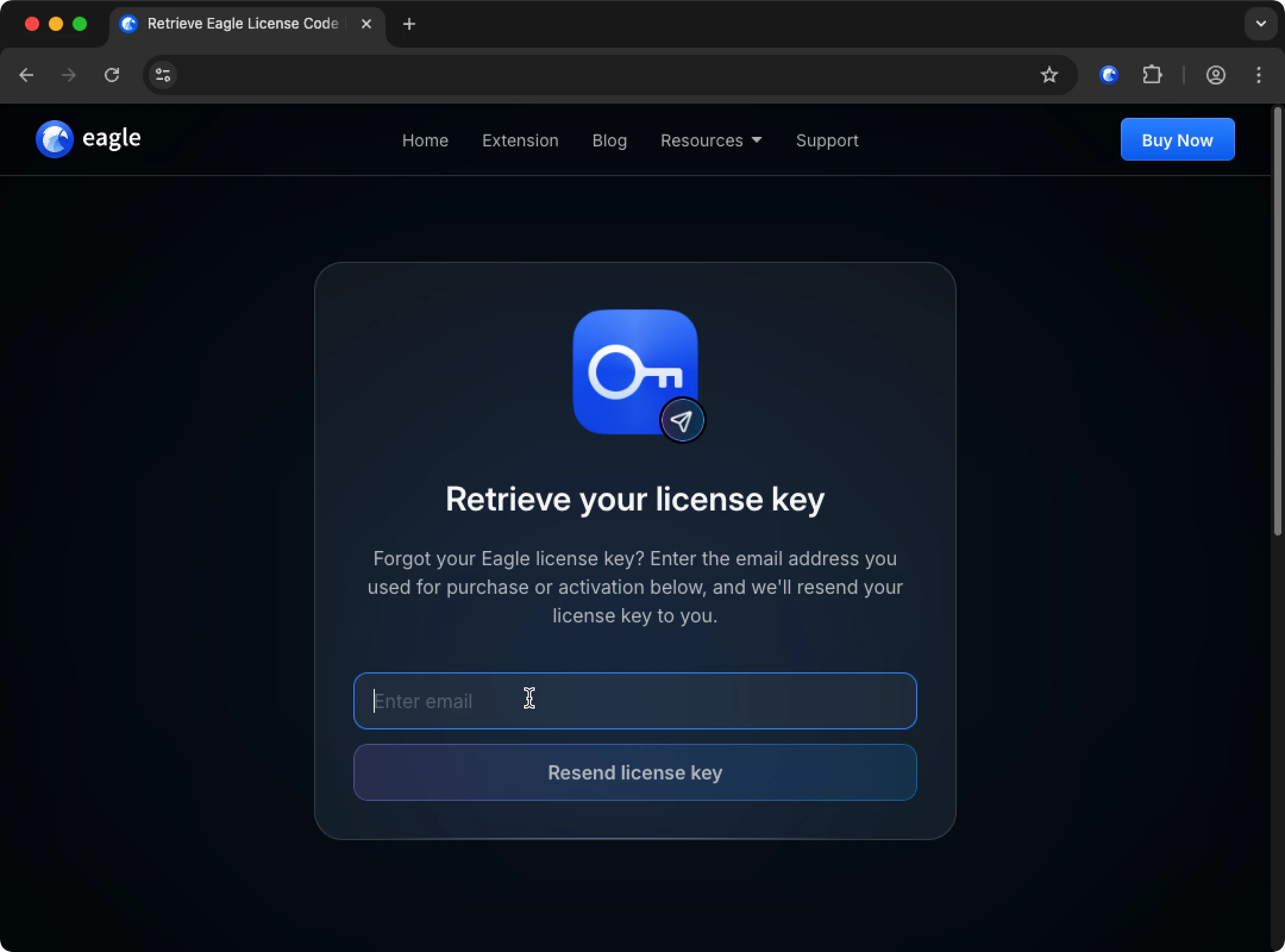
Use the Official Recovery Tool: If you can't find the email, visit the license recovery page and fill in the required information. The system will resend your license key to your email address.
Customer Support Assistance
If the above methods don't work, you can contact our Support page through Payment/License. Please include the following information in your ticket:
- Your name
- The email address used for purchase
- The email address used for license activation
- Whether the purchase was part of a team/bulk purchase (Yes/No)
How to request a refund?
Overview of Refund Policy
Eagle offers a 30-day free trial period for all users. During the trial, all features are fully accessible and identical to the purchased version, with no hidden limitations or premium-exclusive functionality.
We strongly encourage users to thoroughly evaluate Eagle and confirm system compatibility before making a purchase. As users are provided sufficient time to assess the product, refund requests are reviewed under clear and relatively strict standards.
Refund Eligibility Criteria
Refund Reasons We Accept:
- Duplicate purchases of the same product
- At the time of purchase, the user’s device and operating system fell within Eagle’s officially supported environments, but the product could not launch properly or failed to perform core functions, and the issue could not be resolved after official assistance
Refund Reasons We Do Not Accept:
- Subjective or personal reasons, including but not limited to “dislike,” “don’t want it,” “not user-friendly,” “changed my mind,” or financial reasons
- Requests without specific reasons or technical explanations, such as “I just want a refund”
- Requests based on expectations or features outside the product’s stated scope
- Any issues related to plugins from the “Plugin Center,” including compatibility or usage
- Refusal to cooperate with reasonable troubleshooting steps or official support requests
- Inability to use Eagle due to user-initiated actions or environment changes, including but not limited to:
- Changing the operating system after purchase (e.g., Windows or macOS to Linux)
- Using operating systems or device environments not officially supported by Eagle
- Modifying, customizing, or using non-standard or abnormal system configurations
- Running Eagle via virtual machines, remote desktops, cloud environments, or other non-official compatibility solutions
Refund evaluations are based solely on the device and system environment at the time of purchase. Any environment changes made after purchase will not be considered grounds for a refund.
Refund Request Process
- Submit a refund request through our customer service ticket system within 5 days of payment
- Clearly state the reason for the refund and provide relevant system or error details if applicable
- After receiving your request, our team will contact you within 3 business days with the review result
I have purchased Eagle. How do I get an invoice?
Thank you for supporting Eagle! As the Eagle team is based in Taiwan, we can provide invoice documents for tax purposes or other needs. Follow the steps below to request an invoice after your purchase.
How to Request an Invoice
To request an invoice, please submit a support ticket via "Contact Support" and provide the following information in your ticket:
- Company name
- Company address
- VAT number
- License key
Important Notes
-
Time Limitation: Please submit your invoice request within one month of your purchase date. We cannot process requests submitted after this period.
Can I purchase Eagle in App Store?
Currently, we don't consider launching Eagle in App Store, the main reason is the restriction from App store policy. For example, reviewing an app takes at least one week, and there are many safety restrictions such as Apple sandbox rule, these have limited Eagle's merits and the ability to quickly iterate.
I have purchased the license key, how do I activate Eagle?
After purchasing the license key, you will receive an email with the license key. If you haven't downloaded Eagle yet, click here to download Eagle.
It's easy to activate Eagle, please refer to the following steps:
- Open Eagle.
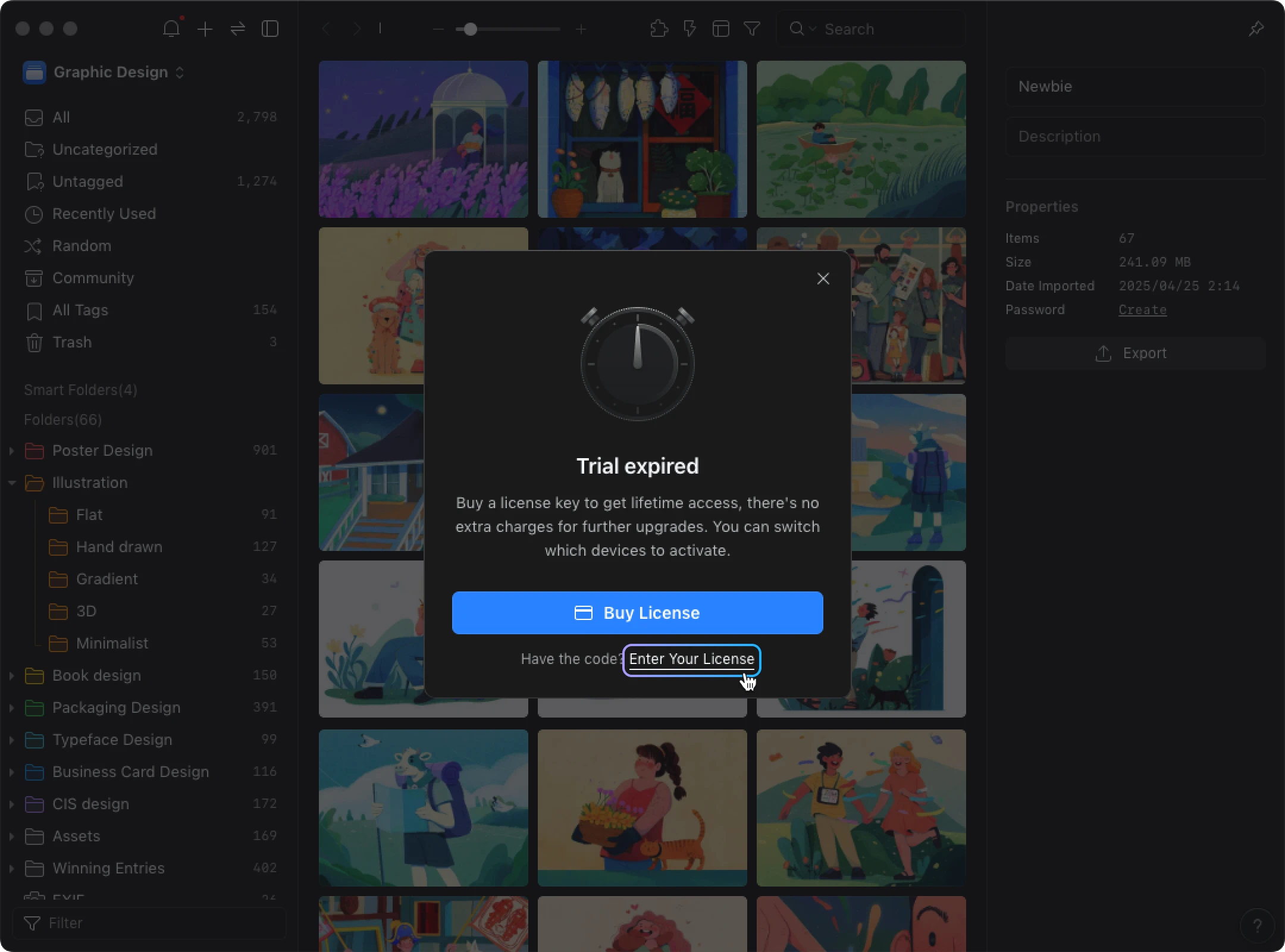
- Click "Enter Your License"
- Copy and paste the license key into the input box and enter your email.
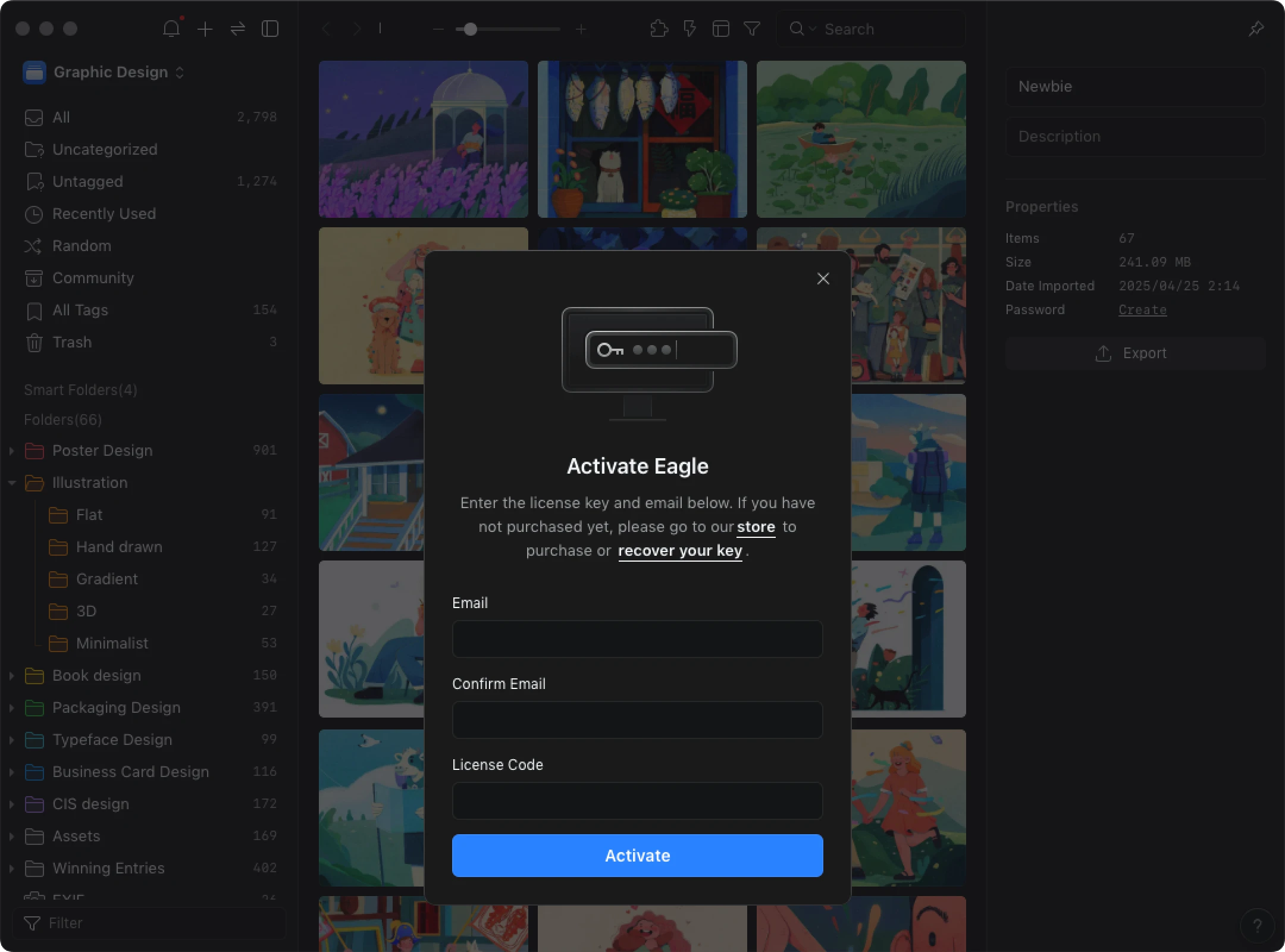
- Activation completed. Enjoy your Eagle experiences!
How to unbind my license key and reactivate on other devices?
All Eagle license keys are free to be activated/deactivated on the devices you wish to use, you can revoke the activated devices and transfer the activation to another device whenever you wish, to do so, please refer to the following steps:
1. Revoke the activation for the current device
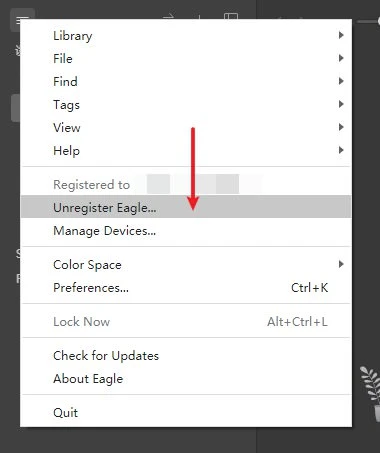
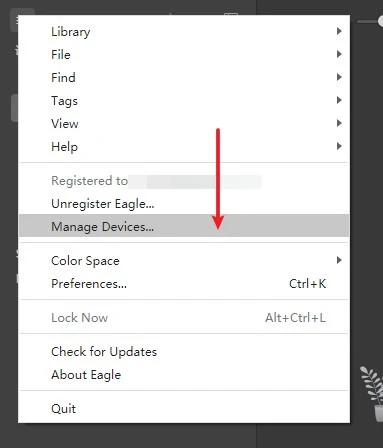
Click on the Eagle's menu > " Unregister Eagle...", the activation for the device is then revoked.
2. Revoke the activation for "Other" devices
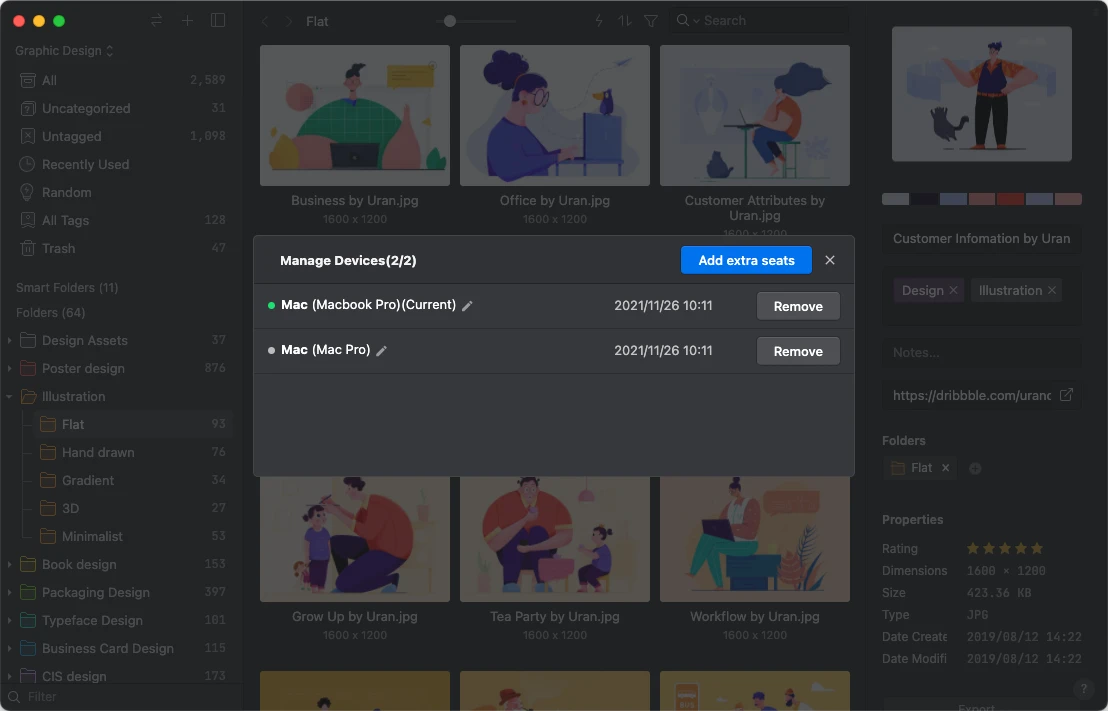
Click on the Eagle's menu, then click "Manage Devices..." to open up the activation management modal.
Select the device you wish to deactivate, then click the "Remove" button.
All Eagle license keys are free to be activated/deactivated on the devices you wish to use, you can revoke the activated devices and transfer the activation to another device whenever you wish, to do so, please refer to the following steps:
1. Revoke the activation for the current device
Click on the Eagle's menu > " Unregister Eagle...", the activation for the device is then revoked.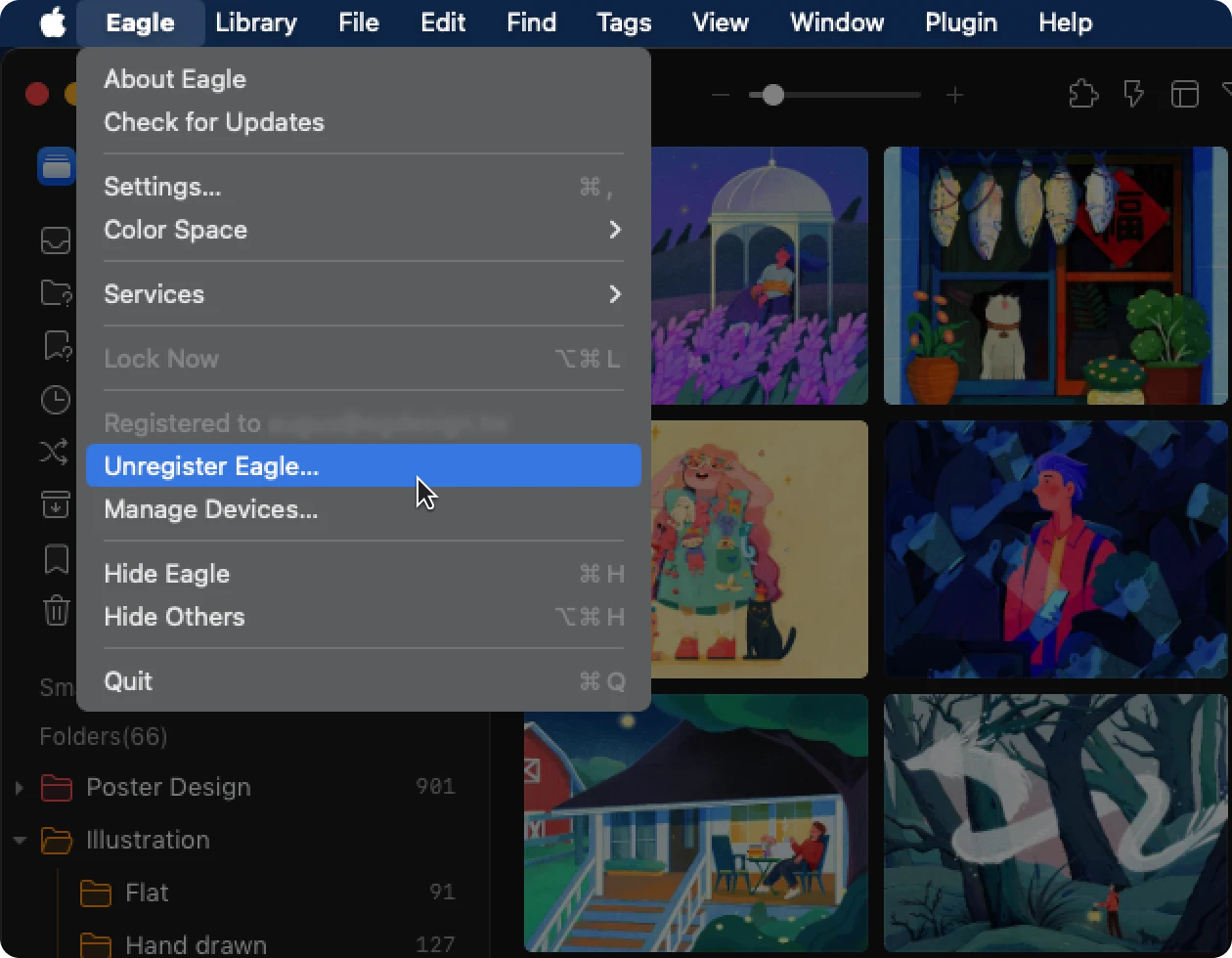
2. Revoke the activation for "Other" devices
Click on the Eagle's menu, then click "Manage Devices..." to open up the activation management modal.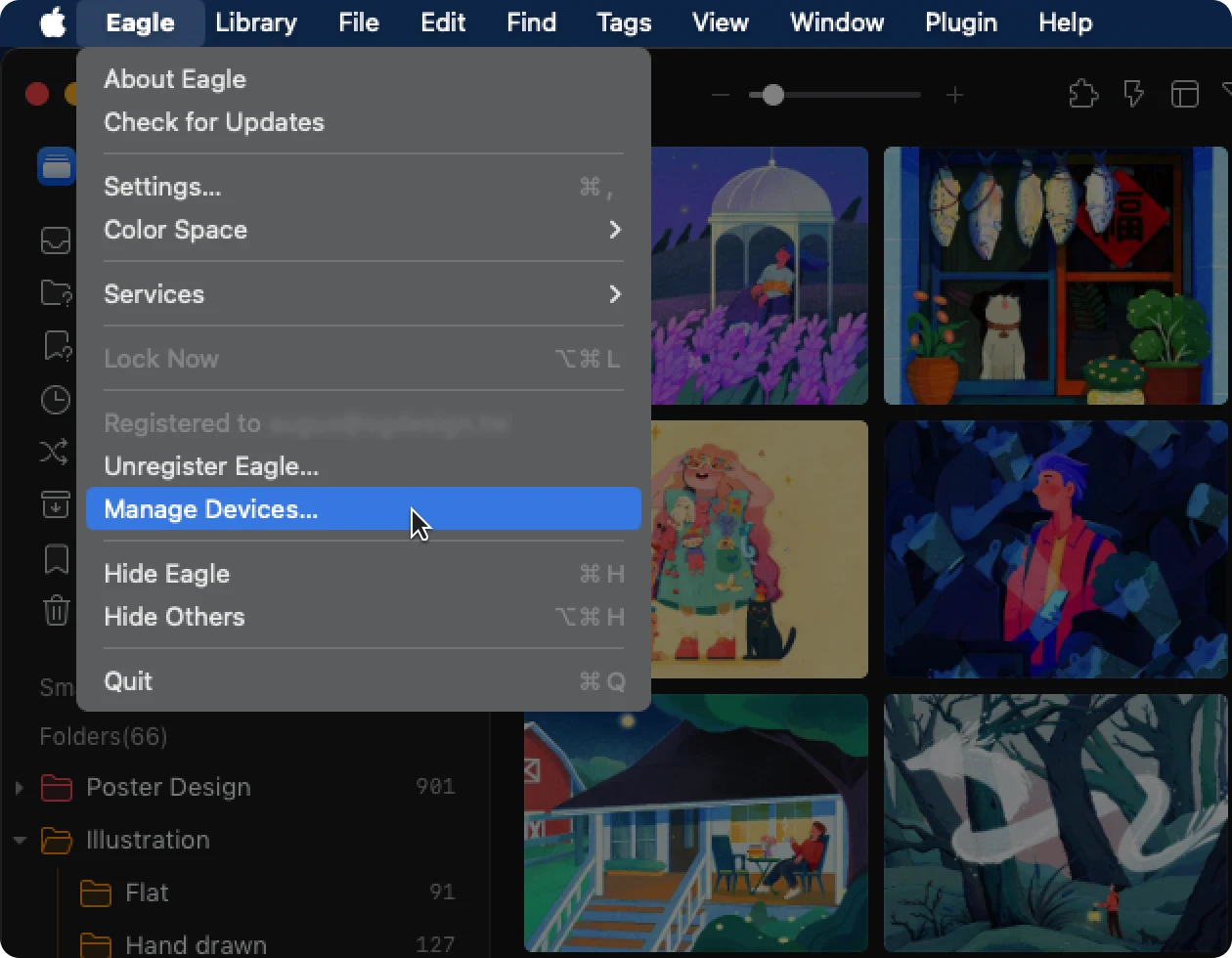
Select the device you wish to deactivate, then click the "Remove" button.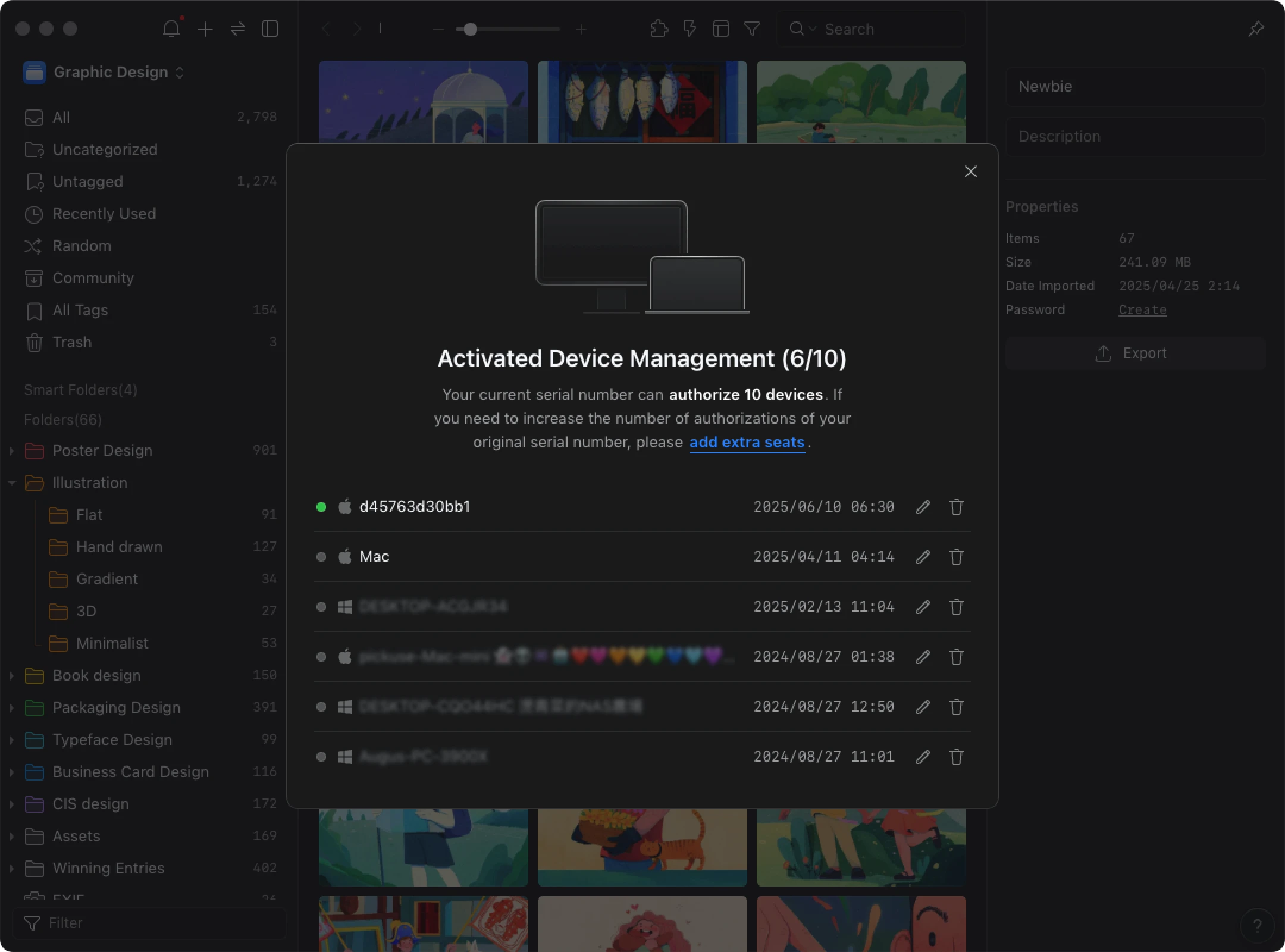
If my computer is lost or broken, can I transfer my license key to other device?
Always Yes, you don't need to worry that your license key will be invalid in the case the device is broken or lost. You can unbind and reactivate your license key on the new device.
What designers and creators say
Real feedback from Eagle’s 450,000+ users.
If you ever have trouble managing your pictures that are always spread around your desktop, Eagle is your star. easy to use and flexible to all platforms, it is the best tool a designer could have.
I have tried a lot of tools and are not very satisfied. Until I met Eagle, it was really a must-have tool for designers to meet my needs.
Eagle solves the image management problems of designers, browser plug-ins, filtering functions save me a lot of time, is a must-have tool for designers!
It is the best image management tool I have used, and I particularly recommend the image search function. It's very good. use!
With Eagle, I can annotate ideas and suggestions on the designer's work, making images collation and retrieval more efficient.
Eagle is not only an image collecting app but very good at organizing. Integrated with image arrangement, tagging, searching, and using experience, definitely a "Second Brain" for designers.
Eagle is a standard tool for UISDC employees. it has all you need, and is well designed. We recommend Eagle for those who are in need of piture managing tools.
Eagle is a pack of surprises and joy. it may seem like a picture managing tool, but it can manage almost anything. Trust me, it’s worth your try.
The emergence of Eagle makes image management and search become a piece of cake. It is necessary for designers or design teams to have good tools.
Since I had Eagle and spent less time looking for images, Eagle has become a good helper and an integral part of my job.
Inspiration managing is a key to design work. Eagle helps make things much easier, it is a must for any designer.
As a trainer focusing on presentation designs, I have a large number of islide-related course wares and cases. When collating and retrieving, I also feel painful to them. Since I met the Eagle, all of this becomes a kind of enjoyment!
If you are a professional content creator who collected thousands of digital resources, Eagle is a must-try! It would make organizing your files an entirely enjoyable experience. Besides, it has an elegant UI design that looks great on both Windows and macOS.
I really wish I found out about Eagle earlier. The app looks gorgeous, is extremely powerful & yet simple to use. Searching through thousands of digital assets is fast & reliable and I never want to miss out on all these time-saving features ever again. Thank you so much!
I turned Eagle into a huge organized collection of web UI inspiration for my projects. I'm amazed at how the Eagle team has taken care of every little detail in the app. I use it pretty much daily and love how I can do almost everything with hotkeys.
I curate for an art blog, and Eagle makes it easy for me to search for just the right image I'm looking for out of the thousands I've uploaded to it using specific tags and keywords. It's indispensable for what I do, saving me time unimaginable!
Eagle is an indispensable tool for me. I can use Eagle as a catch-all tool for collecting references, inspiration pieces, design assets, and bookmarks. I'm also impressed with the web clipping tool that integrates. It makes it really simple to grab embedded images and other assets right from the page. Love it!
One of the best gems I've ever found in the app world! The team is incredibly hardworking and they surprise you with new updates to what you thought was an already perfect app.
My first words in mind are "This is how a app must be made". I am sure developers himself were designer and understands everything a designer needs to organise his digital assets. I used smart folders to freeup my cloud space and creating internet only folder, the color picker palette tool is now part of life and covering almost every file type a graphics designer need. Loved it.
Eagle helps me organize & categorize all of the resources on my computer. Since I used Eagle, I've never missed anything! I also made a stock library with my team through Dropbox, and we contribute it easily.
I've used Eagle to store all of my photos or digital assets for a number of different projects. It organizes everything so well and I no longer have to hunt through numerous files to find my pictures for each separate client or business project. Eagle is well worth the investment!
The most attractive, robust, and fully-featured way of storing, classifying, and accessing images that I've ever seen. I put everything in it, including pdfs, and can always lay my hands on what I need for a job, immediately. Love it.
I have tried so many different ways to organize my UX/UI inspiration over the years and was so happy to finally discover Eagle! It saves me so much time being able to search and browse through saved presentations, sketch files, videos, gifs, and more all in one place.
I was hoping Eagle would be a tool I could use to organize design files, but its features exceeded my expectations, and it is now a tool I use every single day. The number of file types it supports is unreal, and I now have my entire team uses it to organize project files for clients.
I have tried many DAM style apps and none come close to the ease of use and affordability of Eagle. With their built-in web extensions and google drive cloud sync, me & my team can effectively share, manage and organize many different filetypes. This app is indispensable for those in media production or any creative field!
As a UX Designer, I'm constantly doing competitive analysis and research. That means taking tons of screenshots. Eagle lets me grab clean, complete images from the web, tag them, and create smart folders that automatically organize new content. Eagle streamlined an essential part of my design process. I use it every day.
When I began using Eagle nearly two years ago, it instantly became one of my favorite design tools. And since, thanks to the constant updates by the team behind it, it's only gotten better. It's helped me organize inspiration for my projects. I love it, and I'd recommend it to all designers, motion designers, and illustrators.
The ability to organize ideas and assets in a well thought out interface has helped our workflow process greatly when it comes to branding projects, from start to finish. 10/10 - would recommend to anyone who works with branding.
Eagle has become one of my most trusted and used tools and an important part of my daily workflow. I use it at least a dozen times a day to collect or organize images and links for my creative projects. The ability to easily grab images or take screen captures is a thing of beauty!
Eagle Cool has become an indispensable app for me personally and professionally. I'm a neat freak and this software helps keep me organized. It literally has become a repository for my ideas, assets, and designs.
Eagle has accelerated my design process because of its ease of use, easy import, and the numerous file types it supports. My colleagues are impressed by how quickly I can find design assets that they need!
The most valuable tools (for designers) are those that help sustain creativity and momentum. Eagle's browser extension is one of those tools - there when you need it and vanishes when you don't. It requires virtually no effort to use and enables you to stay in the zone. What else could you want?
I currently have more than 8000 photos in my Eagle and have recommended it to my artist friends. I personally love software that is easy to handle. I also love that it saves the metadata of the pictures, like the website the pics are from, etc. Highly recommended for artists, archivists, internet fiends who love to scour the internet for gems.
I have tried many managing tools, but never have I used one as good as Eagle. it is custom made for any designer.
I've tried them all, and Eagle is the best way to organize assets and images and I rely on it daily to keep important things nice and tidy for me. Whether it's assets for current projects, images or photos for slides and talks, videos and animated gifs for research, or screenshots for inspiration later on, Eagle handles the job for me.
As a creative I generate and collect a lot of photos and video that I need to be able to quickly view, archive and sort. No other software does as good of job as Eagle. The fact that they support video is HUGE. Thank you!
I recommend Eagle App to all the creative professionals as I am using it from past few months and it's my daily driver whenever it comes to organizing my graphic design content. You can minimize your hours of works in just few minutes.
Pattern research plays a big role in product design, so I frequently use Eagle to catalog interesting UX ideas across web and mobile. With its powerful and flexible organization tools, Eagle helps future me make sense of it all.
Across my work and personal projects, sorting hundreds of reference images, textures, and assets had become too difficult! Eagle made my life much easier with tagging, and the ability to place things in multiple folders at once.
Eagle is an important tool in my creative workflow. It is helping me to organize my inspirations. I can collect images and videos with its awesome Chrome extension. Tagging feature is great to find related inspirations before starting a new concept. Totally loved it!
Eagle App is perfect application for management asset files, So many great features and it's really help me a lot to manage my design asset and inspiration/ideas I have found from the internet.
If you want to keep your files neatly organized in one place, Eagle is sure to satisfy your needs. Most of all, I like that the interface is clean and user-friendly. Besides, you can batch save images via a browser extension, and locate the needed picture in an instant thanks to a well-developed search feature.
Eagle is my “Second brain” for visuals. Whenever I stumble upon a smart UI solution, a beautiful design, or an inspiring photo, it all gets saved to my library for future reference.
I think Eagle works amazing! I no longer need to look for images scattered around my computer, I'm directly dropping all the images into Eagle and go back to it when I need it. I'm constantly using Eagle to organize my inspiration + reference images for my work.
Eagle offers a simple solution to a digital management problem. Using Eagle has helped me access and organize both photos and music in one program and I see myself continuing to use Eagle in the future. I think that anyone who wants to help organize their digital library should give Eagle a try.
Eagle is something I’ve been looking for for years and is one of the most useful pieces of software I use as a designer. I think Eagle deserves to have a much more prominent position in the designer's toolbox.
With Eagle I can sort dozens of ideas in minutes. Speed is a super important aspect of any discovery tool. Ideas can come from anywhere, and Eagle liberates you from relying on proprietary cloud services to save ideas.
As researchers need a reference application to organize their bibliographies, likewise designers need a place to organize their images. Eagle comes with perfect timing offering a software agile and stable, which allows designers to archive their works in all the available formats.
I've been curating and posting minimal product design every day for one of the biggest design communities on Instagram. Eagle has helped me organize thousands of product photos, and all of them are easy to find because of the tagging system. It's a game changer.
I discovered the app a few months ago. Batch Save, Capture Area, and Capture Page are my top favorite. Dragging images and dropping them on a popup modal is super easy. Organizing images in folders with source URL, image size, notes, and powerful search are all pleasure to use.
Eagle boosted the productivity of our game dev studio by allowing us to manage game assets, game design documents, and marketing materials all in one place. The complex tag system helps us find the right assets much faster when time is essential: client has last minute change, at game jams, etc.
An incredible app! Period! The guys, like wizards, embodied in him everything that could only be dreamed of. Now, collecting, sorting and storing almost any visual content has become a pure pleasure. Inspiration has never been so close and tangible. Hat off guys. My workflow will never be the same again.
Your left brain wants folders. Your right brain wants a creative heap. It really doesn’t matter because Eagle is my AI brain for finding my creative assets based on a multidimensional criteria. Warning: this is addictive stuff.
Eagle is truly amazing! Before, it was easy to save media, but a real struggle to find it later. Now, everything is in one place, and really easy to find with tags. And the search by colors… just WOW!
Eagle made it simple to organize the digital assets. I use the chrome plugin and everything I like on the internet is just drag n drop away. Amazing tool for designers and full stack developers.
I struggle to manage all my website assets, especially for large projects spanning months. This product made my life easier organizing things like images and icons, especially by color, which made my life a lot easier and organized.
Eagle is by far the best visual bookmarking tool I've come across. It packs a ton of intricate functionality into a simple and intuitive experience. I highly recommend it for anyone that is looking for an easy way to collect and organize inspiration and images ✨
The Eagle App has helped me to be better organized in managing my design assets. So that when I need it, I can easily find it. Because the Eagle App has cool filtration features. Now, it's your turn.