
Black Friday
30% off extra seats
Add seats to your existing license key at 30% off. The discount is applied automatically.
Add seats to your license
Add seats to your existing license key to activate Eagle on more devices. Pay once, with no subscription, and switch devices whenever you need.
Frequently Asked Questions
Answers about license keys, devices, refunds, and invoices.
How many devices can be activated by one license key?
Each set of the license key is able to activate two devices, and Eagle is available on both macOS and Windows, you can change which devices you want to activate without any limitation. In the case that you lose or change your PC, the license key is still available on the new device.
To put it simply, the license key can:
- Activate two devices (The license key is bound to the same email)
- Unbind from activated devices at will, there is no limit on the count of reactivation.
- Available on both macOS and Windows
If you’re looking to add seats, devices to your license, you can add extra seats to your existing license key.
Can I add an extra seat or device to my existing license key?
Originally each set of the license key can activate only two devices. Although you can change which devices you want to activate without any limitation, it's still troublesome to activate, deactivate repeatedly between devices.
Now you can easily solve this problem. You can add extra seats to your existing license key. For example, if you want to activate three devices, you can pay to activate one extra device.
Remark:
- In order to add more seats, you have to purchase one set of license key in advance.
- When you pay to add more seats and active devices, you have to enter the email which you used for activating the very first time. You can't associate the license key with 2 or more different emails.
Is my license key lifetime valid?
Yes, the eagle License key is lifetime valid and there are no additional charges for future upgrades. You can authorize two devices for each set of key, the app is available on both macOS and Windows, you can change which devices you want to activate without any limitation. In the case that you lost or change your PC, the license key is still available on the new device.
To put it simply, the license key is:
- lifetime valid
- able to activate two devices (The license key is bound to the same email)
- able to unbind devices at will, there is no limit on the count of reactivation.
- available on both macOS and Windows
I lost my license key, can you resend it to me?
If you've lost your Eagle software license key, you can recover it using the following methods.
Self-Service Recovery Options
-
Check Your Email Records: Search for keywords like "Eagle" or "Eagle App License Key" in your inbox to find messages containing your license key.
-
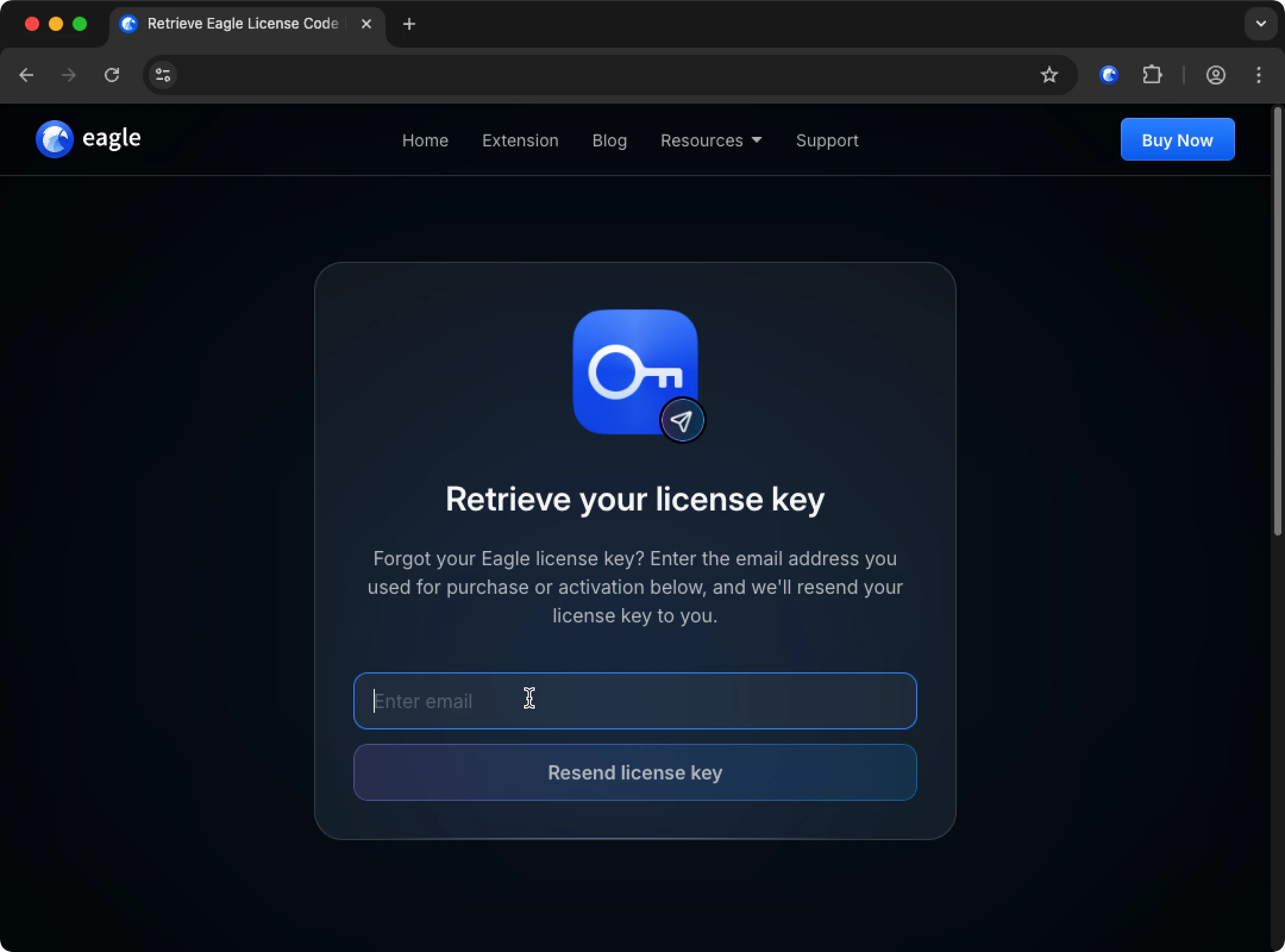
Use the Official Recovery Tool: If you can't find the email, visit the license recovery page and fill in the required information. The system will resend your license key to your email address.
Customer Support Assistance
If the above methods don't work, you can contact our Support page through Payment/License. Please include the following information in your ticket:
- Your name
- The email address used for purchase
- The email address used for license activation
- Whether the purchase was part of a team/bulk purchase (Yes/No)
How to request a refund?
Overview of Refund Policy
Eagle offers a 30-day free trial period for all users. During the trial, all features are fully accessible and identical to the purchased version, with no hidden limitations or premium-exclusive functionality.
We strongly encourage users to thoroughly evaluate Eagle and confirm system compatibility before making a purchase. As users are provided sufficient time to assess the product, refund requests are reviewed under clear and relatively strict standards.
Refund Eligibility Criteria
Refund Reasons We Accept:
- Duplicate purchases of the same product
- At the time of purchase, the user’s device and operating system fell within Eagle’s officially supported environments, but the product could not launch properly or failed to perform core functions, and the issue could not be resolved after official assistance
Refund Reasons We Do Not Accept:
- Subjective or personal reasons, including but not limited to “dislike,” “don’t want it,” “not user-friendly,” “changed my mind,” or financial reasons
- Requests without specific reasons or technical explanations, such as “I just want a refund”
- Requests based on expectations or features outside the product’s stated scope
- Any issues related to plugins from the “Plugin Center,” including compatibility or usage
- Refusal to cooperate with reasonable troubleshooting steps or official support requests
- Inability to use Eagle due to user-initiated actions or environment changes, including but not limited to:
- Changing the operating system after purchase (e.g., Windows or macOS to Linux)
- Using operating systems or device environments not officially supported by Eagle
- Modifying, customizing, or using non-standard or abnormal system configurations
- Running Eagle via virtual machines, remote desktops, cloud environments, or other non-official compatibility solutions
Refund evaluations are based solely on the device and system environment at the time of purchase. Any environment changes made after purchase will not be considered grounds for a refund.
Refund Request Process
- Submit a refund request through our customer service ticket system within 5 days of payment
- Clearly state the reason for the refund and provide relevant system or error details if applicable
- After receiving your request, our team will contact you within 3 business days with the review result
I have purchased Eagle. How do I get an invoice?
Thank you for supporting Eagle! As the Eagle team is based in Taiwan, we can provide invoice documents for tax purposes or other needs. Follow the steps below to request an invoice after your purchase.
How to Request an Invoice
To request an invoice, please submit a support ticket via "Contact Support" and provide the following information in your ticket:
- Company name
- Company address
- VAT number
- License key
Important Notes
-
Time Limitation: Please submit your invoice request within one month of your purchase date. We cannot process requests submitted after this period.
Can I purchase Eagle in App Store?
Currently, we don't consider launching Eagle in App Store, the main reason is the restriction from App store policy. For example, reviewing an app takes at least one week, and there are many safety restrictions such as Apple sandbox rule, these have limited Eagle's merits and the ability to quickly iterate.
I have purchased the license key, how do I activate Eagle?
After purchasing the license key, you will receive an email with the license key. If you haven't downloaded Eagle yet, click here to download Eagle.
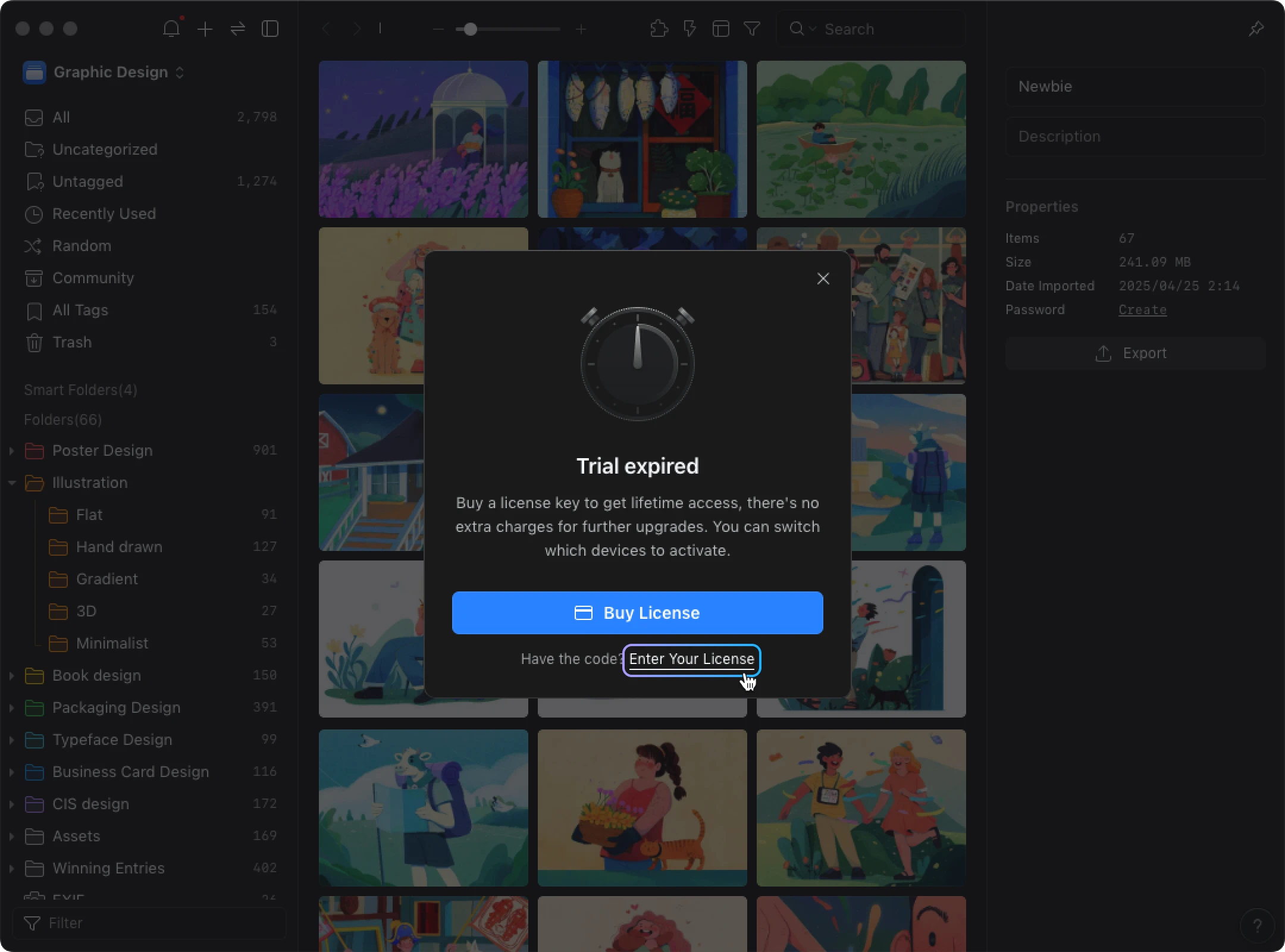
It's easy to activate Eagle, please refer to the following steps:
- Open Eagle.
- Click "Enter Your License"
- Copy and paste the license key into the input box and enter your email.
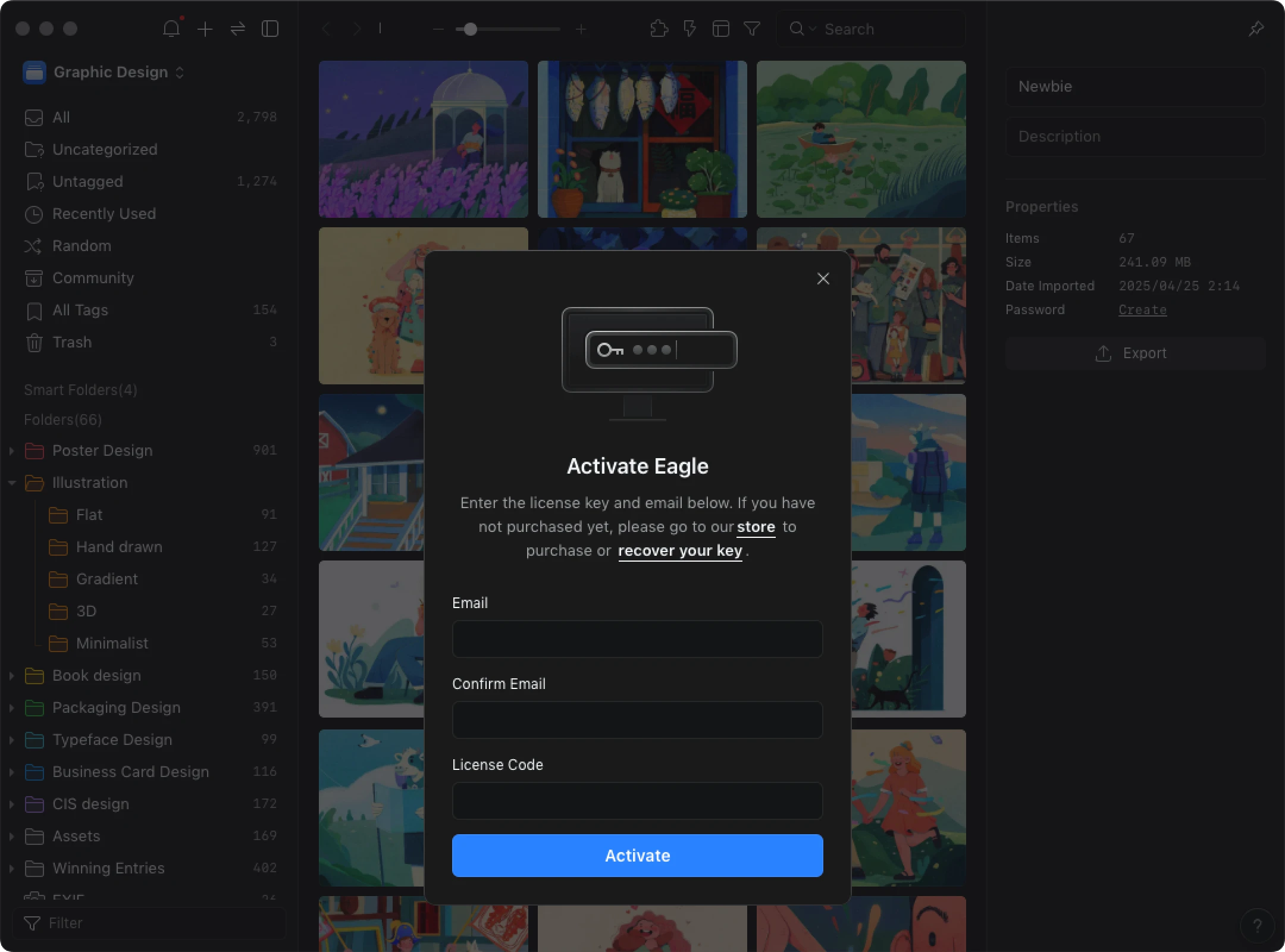
- Activation completed. Enjoy your Eagle experiences!
How to unbind my license key and reactivate on other devices?
All Eagle license keys are free to be activated/deactivated on the devices you wish to use, you can revoke the activated devices and transfer the activation to another device whenever you wish, to do so, please refer to the following steps:
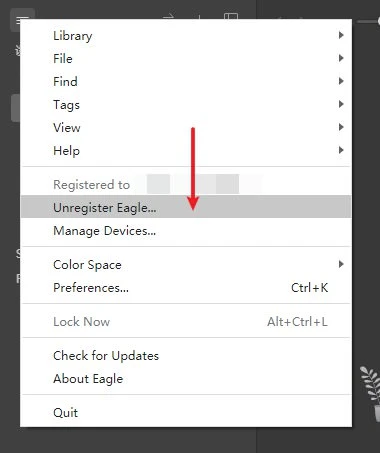
1. Revoke the activation for the current device
Click on the Eagle's menu > " Unregister Eagle...", the activation for the device is then revoked.
2. Revoke the activation for "Other" devices
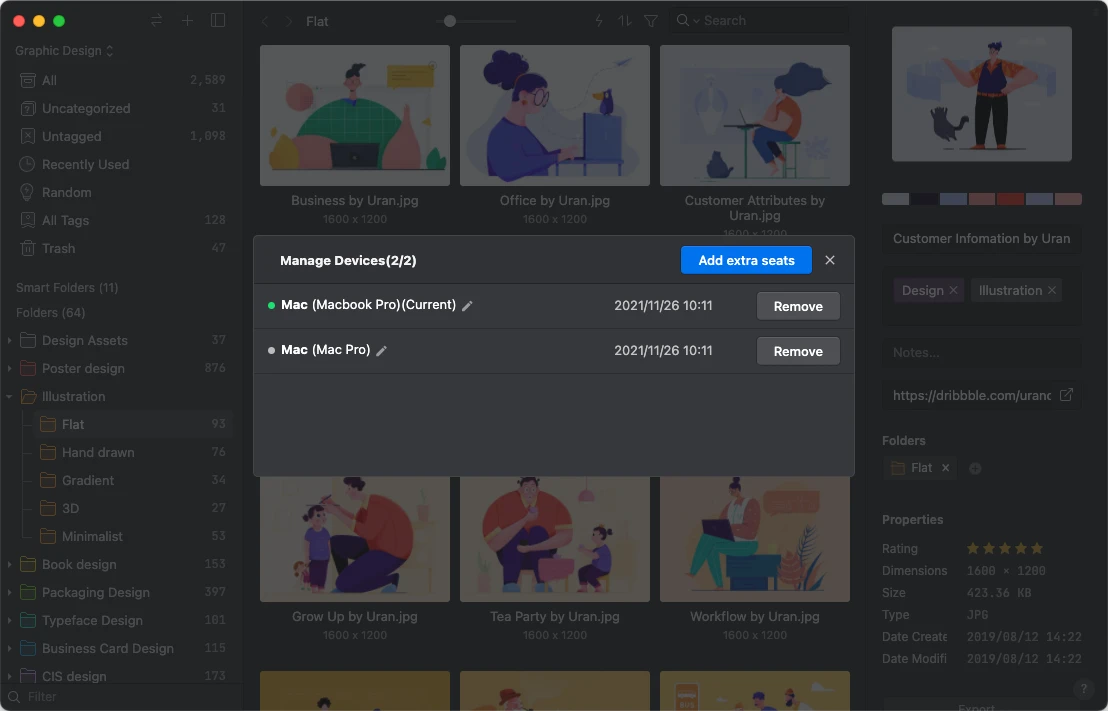
Click on the Eagle's menu, then click "Manage Devices..." to open up the activation management modal.
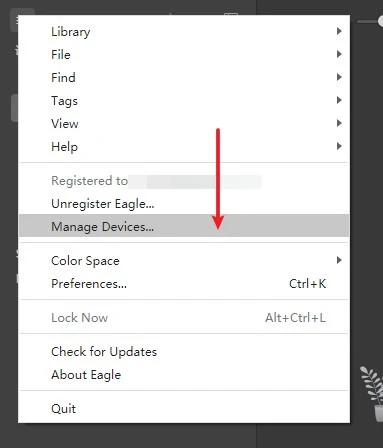
Select the device you wish to deactivate, then click the "Remove" button.
All Eagle license keys are free to be activated/deactivated on the devices you wish to use, you can revoke the activated devices and transfer the activation to another device whenever you wish, to do so, please refer to the following steps:
1. Revoke the activation for the current device
Click on the Eagle's menu > " Unregister Eagle...", the activation for the device is then revoked.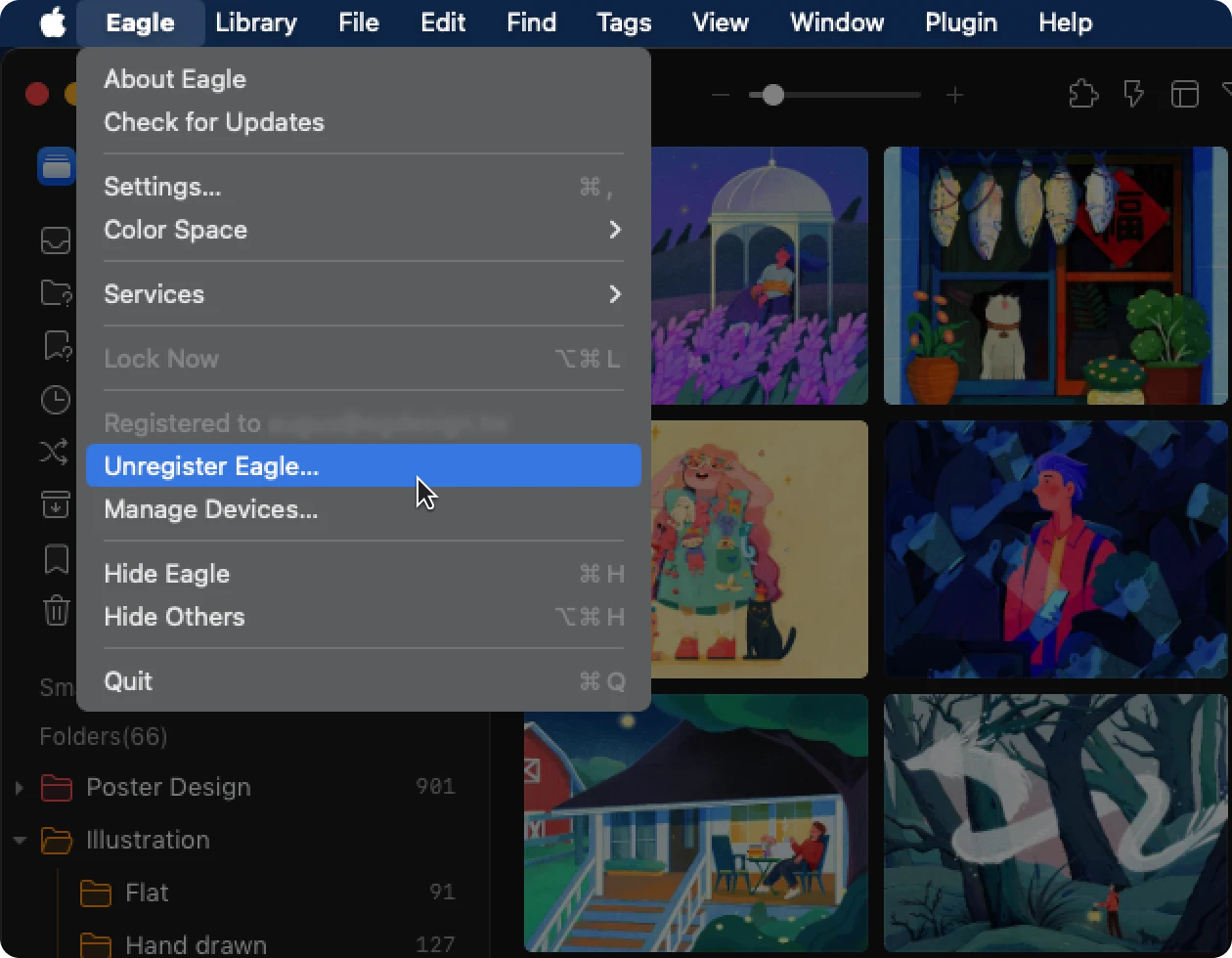
2. Revoke the activation for "Other" devices
Click on the Eagle's menu, then click "Manage Devices..." to open up the activation management modal.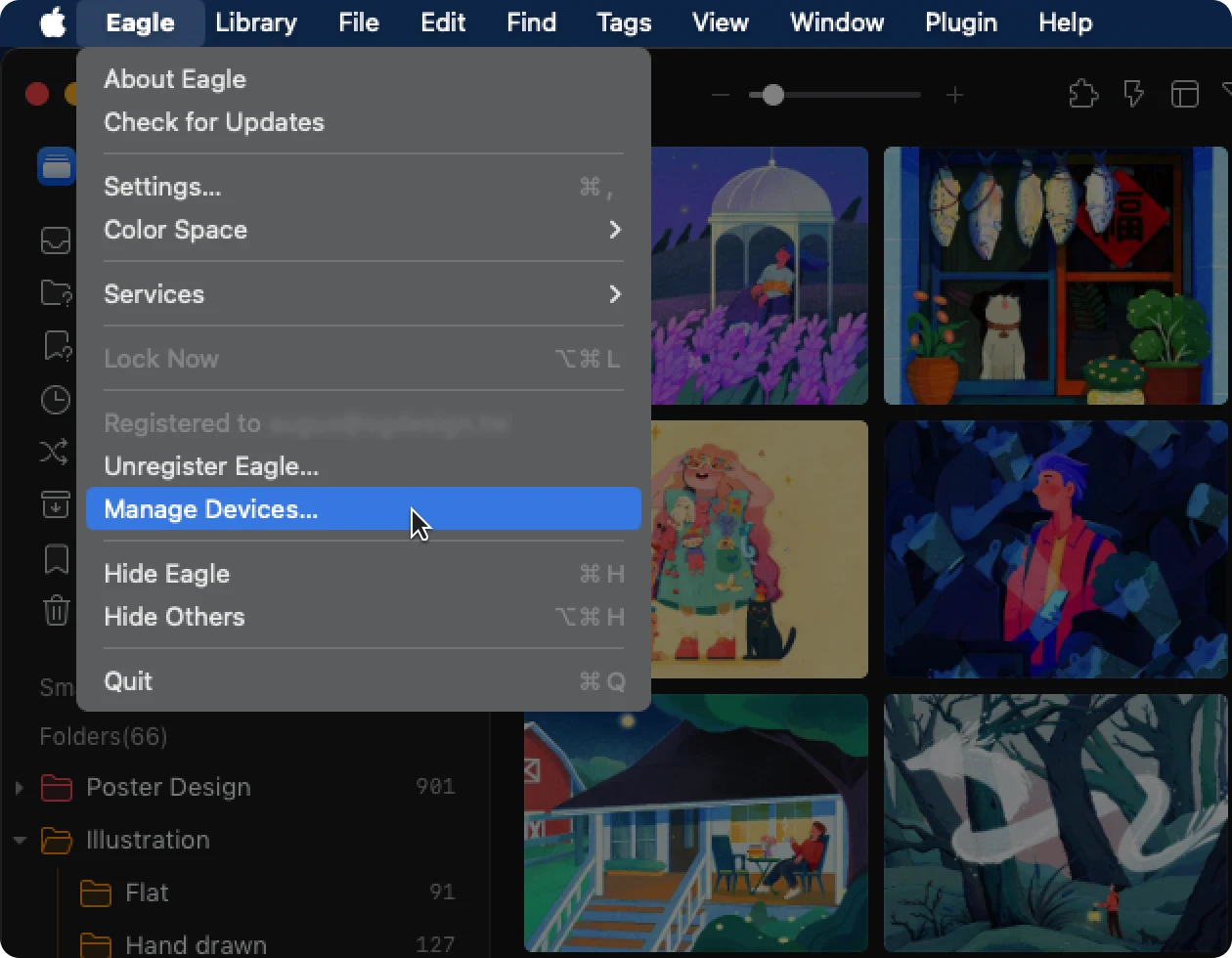
Select the device you wish to deactivate, then click the "Remove" button.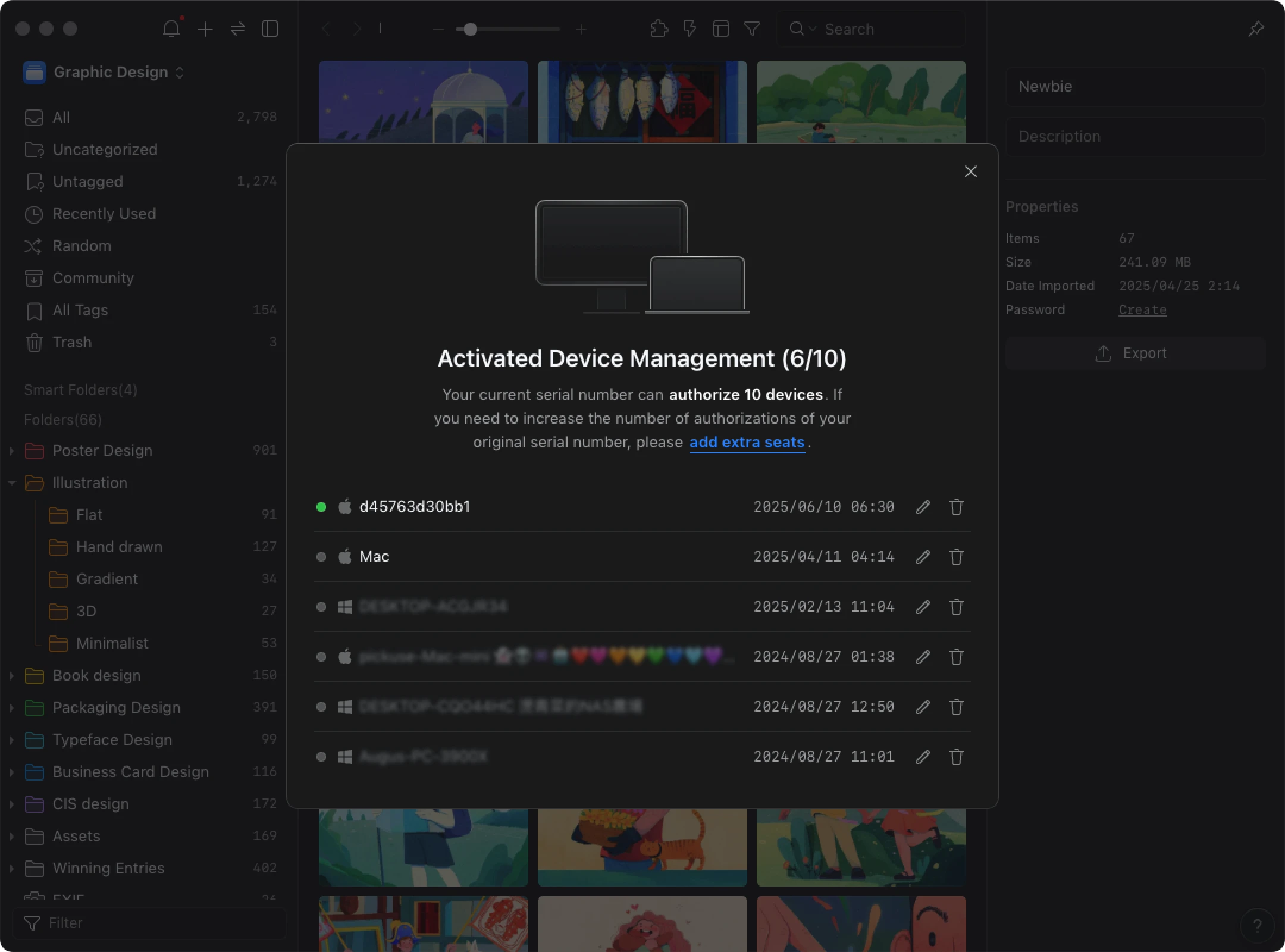
If my computer is lost or broken, can I transfer my license key to other device?
Always Yes, you don't need to worry that your license key will be invalid in the case the device is broken or lost. You can unbind and reactivate your license key on the new device.